+86 18560646018

Views: 228 Author: Focus Color Publish Time: 2026-10-19 Origin: Site


Content Menu
● How to Read an Imagitarium Sticker Thermometer Step by Step
>> 1. Find the Temperature Scale
>> 2. Look for the Green Indicator
>> 3. Interpret Neighboring Colors Carefully
>> 4. Read Under Clear, Indirect Light
>> 5. Wait Until the Display Stabilizes
● What Do the Colors on an Aquarium Thermometer Sticker Mean?
>> Why Green Indicates the Marked Temperature
>> What If Two Numbers Are Showing?
● Where Should You Put a Stick-On Aquarium Thermometer?
>> Install It on the Intended Surface
>> Choose a Representative Location
>> Do Not Assume the Strip Is Repositionable
● How Liquid Crystal Thermometer Strips Work
>> Why the Display Changes Back
● How Accurate Is an Imagitarium Sticker Thermometer?
>> Resolution Is Different From Accuracy
>> Tank-Wall Temperature Is Not Direct Water Measurement
● A Practical Cross-Check for Uncertain Readings
>> Illustrative Comparison Log
● Troubleshooting Common Sticker Thermometer Problems
>> Several Indicators Appear Together
>> The Reading Changes When I Touch It
>> The Sticker and Digital Thermometer Disagree
>> The Strip Is Faded or Peeling
● Manufacturer Insights: Designing a Thermometer People Can Read
>> Match the Scale to the Application
>> Make Instructions Part of the Product
>> Validate the Finished Construction
● Develop a Customized Liquid Crystal Thermometer
>> How do I read an Imaginarium sticker thermometer?
>> Does green mean the water is safe for my fish?
>> What does blue mean on a thermometer sticker?
>> Does a stick-on thermometer go inside the aquarium?
>> Why is my aquarium thermometer sticker completely black?
>> Can I reuse a thermometer sticker after removing it?
>> Can a sticker thermometer replace a reference thermometer?
If you are searching for "how to read sticker thermometer imaginarium," you likely mean the Imagitarium aquarium strip thermometer. The basic method is straightforward: find the green temperature indicator, then read the number beside it. On conventional liquid crystal strips, that number represents the indicated temperature. If neighboring indicators show blue and tan instead, the temperature may fall between their marked values.
However, reading the colors is only part of the process. Placement, lighting, surface contact, and temperature stability all influence what you see.
This guide explains how to interpret an aquarium thermometer sticker, recognize misleading readings, and decide when to verify the result with another instrument. It also provides a manufacturer-oriented checklist for businesses developing customized liquid crystal thermometer products.
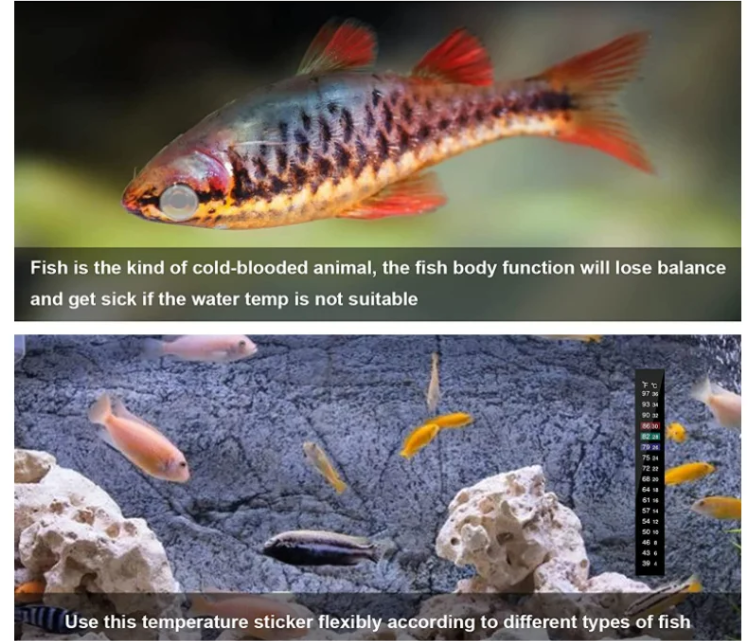
Petco describes the Imagitarium Aquarium Strip Thermometer as a stick-on product that provides a relative aquarium temperature reading. Treat it as a convenient visual indicator rather than assuming it delivers laboratory-level measurements.
The following method explains conventional liquid crystal strip behavior. Always follow the color legend and installation instructions supplied with your particular product.
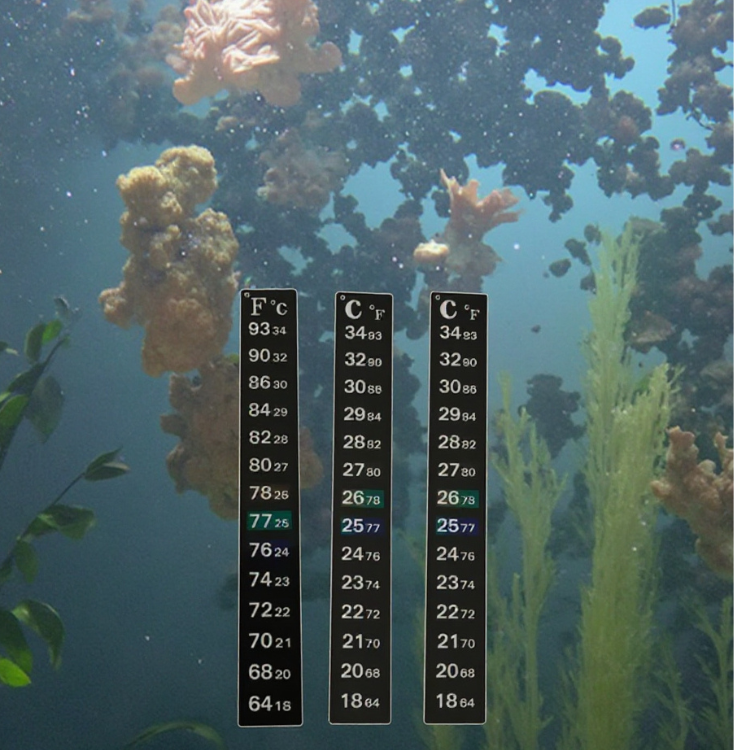
Look for the printed numbers and unit symbols.
- °C means degrees Celsius.
- °F means degrees Fahrenheit.
- Some aquarium thermometer strips display both scales.
Read the number aligned with the active indicator. Do not combine numbers from opposite scales or assume every printed number represents the same unit.
For reference, 25°C equals 77°F. This is a unit conversion, not a recommended temperature for every aquarium.
On conventional liquid crystal thermometer strips, the indicator calibrated to the current temperature appears green.
For example, if the indicator beside 25°C is clearly green, the strip is indicating approximately 25°C at its sensing location.
Importantly, green does not mean "safe for every fish." It identifies a temperature on the scale. Whether that temperature is suitable depends on the animals you keep.
Several adjacent indicators may appear simultaneously because their color-response ranges overlap.
| Display appearance | Typical interpretation | Recommended response |
|---|---|---|
| One clearly green indicator | Temperature is near that marked value | Read the corresponding number |
| Green with neighboring blue or tan | Adjacent elements are also responding | Use the green value as the primary indication |
| Blue and tan without clear green | Temperature may lie between marked values | Treat the result as an estimate |
| No visible colored indicator | Lighting, range, installation, or damage may be involved | Check conditions before concluding anything |
These interpretations describe conventional liquid crystal technology. They are not a substitute for an Imagitarium-specific instruction sheet.
Face the strip directly and reduce reflections from windows or aquarium lighting.
Use enough light to distinguish green from blue and tan. Avoid warming the strip with your fingers while checking it.
If the colors remain ambiguous, record a temperature interval rather than inventing a precise number.
After installation, a water change, or a heater adjustment, let conditions settle before interpreting the display.
There is no single waiting time that can be guaranteed for every aquarium and strip. The sensing material responds to its local temperature, while the water, tank wall, and surrounding air may stabilize at different rates.
The most useful distinction is between the color of an individual sensing element and the temperature printed beside it.
A blue indicator does not automatically mean the entire aquarium is too cold. Similarly, a tan indicator does not automatically mean the aquarium is too hot.
Liquid crystal thermometer strips contain temperature-sensitive elements formulated to change reflected color as their temperature changes.
In a conventional design, an individual element progresses through tan, green, and blue as it warms through its response range. The manufacturer calibrates the green stage to the element's printed temperature.
Consequently, a lower-numbered element may appear blue while a higher-numbered element appears tan.
Suppose a conventional strip shows:
- Blue at 24°C.
- Tan at 26°C.
- No clearly green indicator.
The temperature may be approximately between those values, around 25°C. This is an illustrative interpretation, not a verified reading from a particular Imagitarium model.
Do not add a decimal place or claim greater precision than the scale supports. A visual estimate between two marks remains an estimate.
A correctly interpreted display can still be misleading if the strip is poorly positioned.
An external aquarium thermometer senses conditions at the tank wall. Its usefulness therefore depends on how well that location represents the water you want to monitor.
Conventional adhesive aquarium strips are installed on the outside of the tank. Do not submerge a product unless its manufacturer explicitly approves underwater use.
Before applying it:
1. Confirm the mounting instructions.
2. Clean the selected exterior area.
3. Dry the surface completely.
4. Position the sensing section below the normal waterline.
5. Apply the strip evenly without obvious gaps.
Check compatibility before using cleaning products on acrylic or coated surfaces.
Select a visible area that allows consistent readings.
Avoid locations directly influenced by:
- Strong sunlight.
- Heating or cooling vents.
- Nearby heat-producing equipment.
- Frequent hand contact.
- A waterline that regularly drops below the sensing section.
Avoid placing the strip where it primarily reflects a localized hot spot rather than general aquarium conditions.
Adhesive construction varies. Removing and reapplying a strip may affect its contact with the tank wall.
Unless the product is described as reusable or repositionable, choose the location carefully before installation. Replace a damaged or poorly adhering strip rather than repeatedly moving it.
An aquarium temperature sticker does not need a battery because its sensing material responds directly to temperature.
Thermochromic liquid crystals selectively reflect visible light. As temperature changes, their molecular arrangement changes, altering the color you observe.
Multiple sensing elements create a readable scale. Each element corresponds to a different temperature.
Liquid crystal elements can appear black both below and above their active temperature range.
Therefore, an entirely dark display does not prove that the aquarium is cold. Possible explanations include:
- Temperature outside the strip's range.
- Insufficient lighting.
- Poor viewing conditions.
- Deterioration of the sensing material.
- An installation problem.
An independent water-temperature measurement helps distinguish these possibilities.
Most liquid crystal thermometer strips are reversible. Their colors change again as temperature rises or falls.
This makes them suitable for repeated visual checks. However, a reversible strip does not preserve a temperature history or show the highest temperature reached while nobody was watching.
The responsible answer is that no model-specific numerical accuracy should be assumed without a published specification.
Petco describes this product as providing a relative reading. That wording supports using it for general observation, not assigning an unsupported tolerance such as ±0.5°C.
Resolution describes how finely a scale divides temperature.
Accuracy describes how closely an indicated result agrees with the actual temperature under specified conditions.
A strip printed in small increments is not automatically accurate to those increments. Likewise, a digital thermometer displaying decimal places is not automatically more accurate than every other design.
An exterior strip senses its own temperature while attached to the tank wall. Heat transfer through the wall connects it to the water, but room-side conditions can also influence it.
This explains why an exterior strip and an immersed probe may disagree without either display being completely nonfunctional.
For consequential decisions, verify water temperature with an appropriately specified instrument rather than relying exclusively on the sticker.
I would approach an unclear strip reading by checking the measurement conditions before adjusting the heater. Changing equipment settings based on an ambiguous color can create another problem instead of solving the first one.
Use this comparison procedure:
1. Leave the strip installed in its normal position.
2. Place a suitable reference thermometer in the aquarium according to its instructions.
3. Avoid direct contact between the reference sensor and the heater or tank wall.
4. Allow both displays to stabilize.
5. Compare readings without touching the strip.
6. Repeat under similar conditions to see whether the difference persists.
Record the reference instrument's stated accuracy alongside the results. Two instruments disagreeing does not, by itself, establish which one is correct.
| Check | Strip observation | Reference reading | Interpretation |
|---|---|---|---|
| First | Green near 25°C | 25.2°C | Broadly consistent indications |
| Second | Between 24°C and 26°C | 25.1°C | Strip interval contains reference reading |
| Third | No visible color | 25.0°C | Investigate visibility, contact, range, or condition |
These examples are hypothetical. They are not test results for Imagitarium or Qingdao Focus On Color products.
Improve lighting and check the printed operating range. Confirm the strip is attached correctly and remains below the waterline.
Then measure the water independently. Do not assume a black strip means the water is dangerously cold.
Look first for a clearly green element. If none appears, use the supplied legend to interpret neighboring colors.
When the distinction remains unclear, report an approximate interval rather than selecting whichever number looks brightest.
Your hand can warm the sensing area. Remove your hand and let the display settle before reading it again.
Check placement, stabilization, tank-wall contact, and each instrument's specifications.
Do not average the two readings automatically. Averaging does not correct an unknown measurement error.
Poor adhesion can interfere with consistent surface contact. Liquid crystal materials can also deteriorate after excessive ultraviolet exposure or extreme temperatures.
If readability or contact cannot be restored safely, replace the strip.
From a product-development perspective, the challenge extends beyond making a material change color. The finished thermometer must communicate that change clearly under realistic conditions.
For OEM/ODM buyers, three design decisions deserve particular attention.
Specify the intended temperature range and useful increments before finalizing artwork.
Aquarium, room, packaging, and other surface-monitoring applications have different requirements. One scale should not be presented as universally suitable.
A useful package should explain:
- Where to install the strip.
- Which color identifies the marked temperature.
- How to interpret neighboring indicators.
- What an entirely dark display can mean.
- When independent verification is appropriate.
Readable unit symbols and high-contrast graphics help reduce avoidable interpretation errors.
Testing should address the completed product, including its sensing elements, protective layers, adhesive, printing, and intended mounting surface.
A meaningful specification should distinguish response time, resolution, accuracy, storage conditions, and service limitations. Material sensitivity alone does not establish finished-product performance.
Qingdao Focus On Color Industry & Trade Co., Ltd. offers photochromic, thermochromic, liquid crystal thermometer, and fragrance product series, with more than 13 years of manufacturing experience, according to the company information supplied for this article.
For a customized thermometer project, send our team your target application, temperature range, unit preference, dimensions, mounting surface, artwork, and expected order volume. We can discuss OEM/ODM requirements and an appropriate sample-evaluation plan.
The independent brand discussed here is not presented as a customer, partner, or product manufactured by our company.
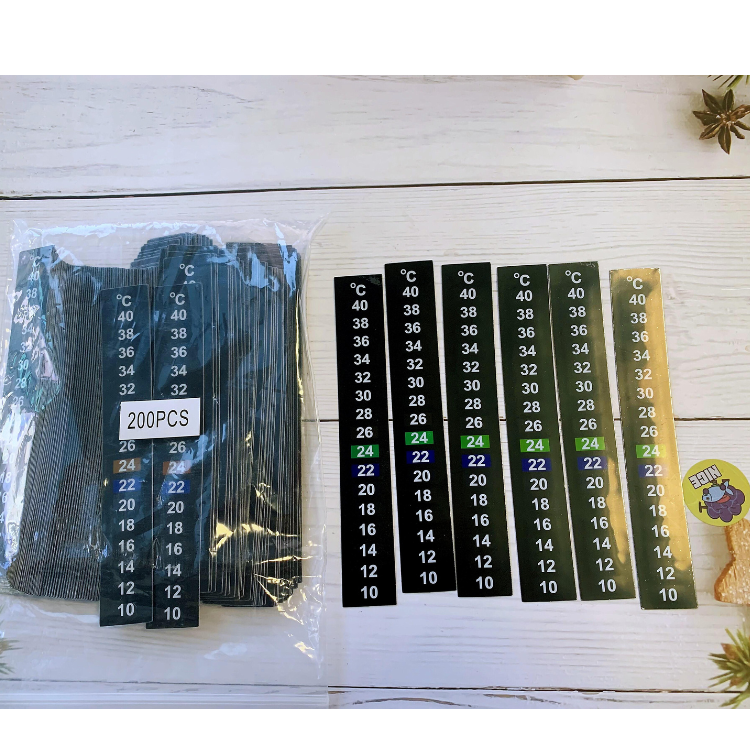
For the Imagitarium aquarium strip commonly associated with this search, check the supplied instructions and locate the active indicator. Conventional liquid crystal strips use green to indicate the corresponding marked temperature.
No. Green identifies a temperature value. Suitability depends on the species and aquarium requirements, not the color alone.
On conventional strips, blue usually means an individual sensing element is warmer than its green calibration point. It does not automatically mean the aquarium is too cold.
Conventional adhesive aquarium strips mount outside. Only submerge a product if its manufacturer explicitly permits it.
It may be outside its active range, difficult to see, poorly installed, or deteriorated. Check the water temperature independently before drawing conclusions.
Only if the manufacturer identifies it as repositionable or reusable. Removal can affect adhesion and surface contact.
It can provide convenient visual monitoring. Verify uncertain readings and important temperature decisions with a suitable instrument whose specifications meet the application.
1. Petco. "Imagitarium Aquarium Strip Thermometer." Product identification and description of its relative-reading function. [petco]
2. SpotSee. "Liquid Crystal Thermometers." Technical explanation of reversible liquid crystal indicators, green calibration, color sequences, and intermediate readings. [spotsee]
3. SpotSee. "Liquid Crystal – Q&A." Explanation of passive temperature sensing and reversible versus irreversible indicators. [spotsee]
4. Manoj Phatak, Smartglass World. "Liquid Crystal Thermometers." Background on strip construction, neighboring indicator colors, viewing requirements, and material degradation. [smartglassworld]
5. SpotSee. "Thermochromic Liquid Crystals: Fun Meets Function in Branding." Background on battery-free operation, customization, and application-dependent temperature ranges. [spotsee]


