+86 18560646018

Views: 218 Author: Focus Color Publish Time: 2026-08-28 Origin: Site


Content Menu
● What Is a Thermometer Strip?
● How to Read a Thermometer Strip Correctly
>> 1. Check the Printed Temperature Scale
>> 2. Apply the Strip to a Clean, Dry Surface
>> 3. Wait for the Color to Stabilize
>> 4. Find the Green Temperature Window
>> 5. Interpret Blue and Tan When Green Is Not Visible
● Understanding the Color Sequence
>> Example: Reading a 20°C–30°C Container Strip
● Where Thermometer Strips Work Best
● Best Practices for More Reliable Results
● Can You Use a Thermometer Strip for Body Temperature?
● Common Thermometer Strip Problems
>> The Strip Does Not Change Color
>> The Colors Look Dull or Hard to Read
>> The Strip and Digital Thermometer Differ
● Custom Thermometer Strips for Your Product
● FAQ
>> 1. Which color should I read on a thermometer strip?
>> 2. What if no part of the thermometer strip turns green?
>> 3. How long should I wait before reading a temperature strip?
>> 4. Are thermometer strips accurate?
>> 5. Can a thermometer strip measure liquid temperature through a bottle?
>> 6. Can I reuse a liquid crystal thermometer strip?
>> 7. Why does my thermometer strip look black or brown?
A thermometer strip is a simple, fast way to check temperature without batteries, probes, or complicated setup. Whether you use a liquid crystal thermometer strip on the forehead, an aquarium, a brewing vessel, a bottle, or industrial equipment, the key is knowing how to interpret its color pattern correctly.
At Qingdao Focus On Color Industry & Trade Co., Ltd., we have worked with thermochromic materials and customized temperature-indicating products for more than 13 years. In our experience, the most common issue is not the strip itself—it is reading it before it has stabilized, placing it on an unsuitable surface, or mistaking a transitional color for the final result.
This guide explains exactly how to read a thermometer strip, what the colors mean, how to improve consistency, and when to use another temperature-measurement method.

A thermometer strip, also called a liquid crystal temperature strip, contains thermochromic liquid crystal materials. These materials react to temperature changes by reflecting different visible colors.
Unlike a digital thermometer, a temperature strip does not display a number electronically. Instead, individual temperature windows or segments change color as the surface reaches a calibrated temperature range.
Most reversible liquid crystal temperature strips follow a similar color sequence:
- Tan, brown, or black: The indicated temperature is usually below the active range or above it.
- Blue: The temperature is approaching the indicated value from below.
- Green: This is normally the correct or closest temperature reading.
- Yellow, orange, or red: The temperature may be moving above that point, depending on the strip's formulation and printed scale.
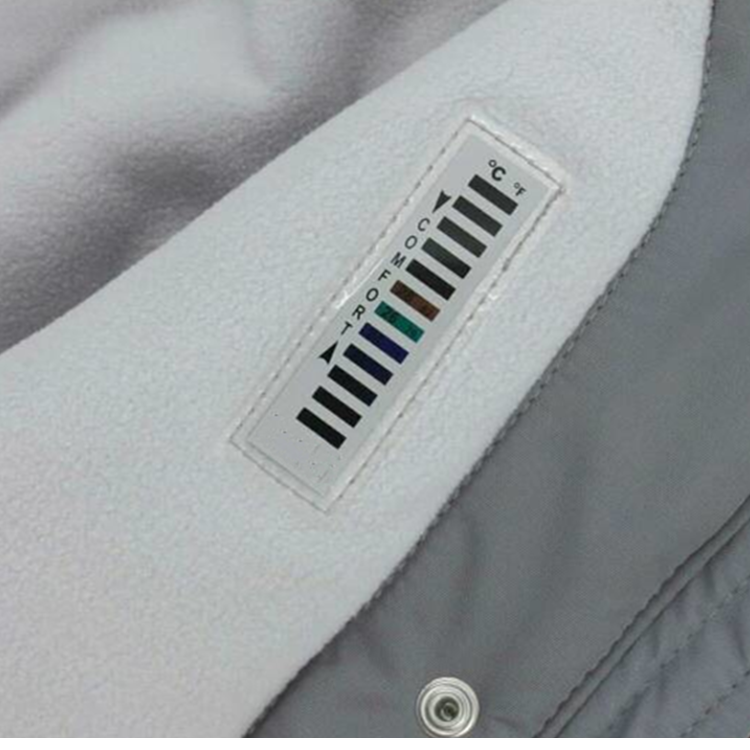
For most liquid crystal thermometer strips, the segment that turns green represents the temperature to read. If one segment is blue and the next higher segment is tan or brown, the actual temperature is generally between those two marked values.
Reading a thermometer strip is easy, but accuracy depends on following the right sequence.
Start by identifying the measurement unit printed on the strip:
- °C: Degrees Celsius
- °F: Degrees Fahrenheit
- Dual scale: Both Celsius and Fahrenheit
For example, a strip may display 32°C to 38°C, 90°F to 100°F, or another custom range designed for a particular application. Forehead strips commonly cover a narrow body-temperature range, while aquarium, brewing, and industrial strips may use broader or higher ranges.
Always confirm that the strip's operating range matches the temperature you need to monitor. A 90°F–100°F forehead strip is not suitable for a hot-water process, and a 0°C–50°C container strip is not intended for clinical use.
Place the thermometer strip directly onto the surface you want to measure. For self-adhesive products, remove the backing carefully and press the strip flat against the surface.
For best performance:
- Use a clean, dry, smooth surface
- Avoid air bubbles beneath adhesive strips
- Keep the display facing outward
- Do not cover the strip with labels, tape, insulation, or your hand
- Avoid placing it where direct sunlight, steam, or airflow will distort the local temperature
On containers, apply the strip where the temperature is most representative of the contents. For a liquid-filled bottle or tank, this is often the mid-height area rather than the very top or bottom.
Do not read the strip immediately after application. The liquid crystal layer needs time to respond to the actual surface temperature.
As a practical rule, wait at least 30 seconds after applying or touching a strip before recording the result. In situations with a large temperature difference—such as moving a container from a cold room to a warm production area—allow more time until the color display stops changing.
For repeatable quality-control checks, use a consistent waiting time. This helps reduce variation between operators and locations.
The green window is usually the main reading.
For example, if the 24°C segment turns green, read the temperature as 24°C. If the strip uses Fahrenheit, a green 75°F segment means the measured surface is approximately 75°F.
The green color appears because the liquid crystal formulation is calibrated to reflect green light at a specific temperature point. As the temperature rises or falls, the reflective wavelength changes and the color shifts through the sequence. Thermochromic liquid crystals can be formulated for a wide range of temperature applications, from low-temperature monitoring to elevated industrial process ranges.
Sometimes no segment appears green. This does not necessarily mean the strip has failed.
Use the adjacent colors to estimate the reading:
| Color pattern on strip | How to interpret it |
|---|---|
| One segment is green | Read the number beside the green segment |
| Lower segment is blue, next higher segment is tan/brown | The actual temperature is between those two values |
| All segments are dark, tan, or inactive | Temperature may be below the strip's measuring range |
| All segments are dark after a heating event | Temperature may be above the strip's measuring range |
| Colors change rapidly | Wait longer for the strip and surface to stabilize |
For instance, if 22°C looks blue and 23°C looks tan, the surface temperature is approximately between 22°C and 23°C. The exact interpretation should always follow the color guide supplied for that specific strip design, because color arrangements can vary by formulation.
Liquid crystal thermometer strips use a reversible color response. As temperature rises, the display may move through darker, reddish, yellow, green, blue, and dark states. When temperature falls, the colors generally reverse in the opposite direction.
This reversible behavior makes these products useful for ongoing monitoring. A user can quickly see whether a surface is warming, cooling, or remaining within a preferred range.
However, color alone should not be interpreted without checking the number beside the active segment. Different temperature strips use different calibration ranges, segment spacing, background designs, and color layouts.
Imagine a liquid crystal temperature strip attached to a beverage container:
- 22°C appears blue
- 23°C appears green
- 24°C appears tan
The best reading is 23°C.
If 22°C is blue and 23°C is tan, with no green visible, the temperature is likely between 22°C and 23°C.
If every segment remains dark and the container feels cold, the temperature may be below 20°C. If every segment turns dark after exposure to heat, it may be above 30°C. In both cases, use a strip with a more appropriate operating range.
Thermometer strips are designed for fast, visible, at-a-glance temperature indication. They are especially useful where a permanent display is more practical than repeatedly inserting a probe.
- Aquariums and fish tanks: Monitor water temperature through the outside glass.
- Brewing and fermentation: Track vessel-wall temperature during fermentation.
- Wine, beverages, and food containers: Check storage or serving conditions.
- Baby bath and household products: Provide a visible temperature indication.
- Reptile habitats and terrariums: Monitor enclosure surfaces.
- Medical screening strips: Offer a quick initial visual body-temperature indication.
- Industrial packaging: Show whether a product, container, or surface has reached a target temperature.
- Promotional products: Combine useful temperature indication with branded packaging or graphics.
For manufacturers and brand owners, the major advantage is flexibility. A strip can be tailored by size, adhesive type, temperature range, scale format, color design, packaging, and brand presentation.
A temperature strip measures the temperature of the surface it contacts. It does not automatically measure the exact internal temperature of a liquid, food product, machine component, or human body.
Follow these practices to improve reliability:
1. Match the strip range to the application.
Select a range that centers on your actual working temperature. If a process normally runs at 45°C–55°C, do not use a 20°C–30°C strip.
2. Use a stable measurement location.
Measure the same area each time. Avoid locations close to heating elements, cold air outlets, seams, handles, or direct sunlight.
3. Allow enough response time.
Wait until colors stabilize. Fast changes in ambient temperature can create temporary transitions.
4. Read under normal lighting.
Strong glare, colored lighting, and reflections can make green, blue, or tan segments harder to distinguish.
5. Keep the viewing surface clean.
Dirt, condensation, scratches, and chemical residue can reduce visibility.
6. Avoid excessive bending.
Flexible strips can conform to curved containers, but sharp folds may damage the indicator layer or affect adhesion.
7. Verify critical measurements.
Where safety, compliance, production release, or clinical decisions are involved, confirm the result with a calibrated instrument appropriate for the application.
A forehead thermometer strip can provide a quick visual indication, but it should not be treated as the only basis for a medical decision. Skin temperature can be influenced by room conditions, sweating, sun exposure, head coverings, recent exercise, and contact with warm or cold surfaces.
For a possible fever or health concern, use a suitable clinical thermometer and follow its instructions. A healthcare provider may recommend a specific measurement method based on age, symptoms, and individual circumstances. Pediatric guidance from Nationwide Children's notes that fever strips are not recommended as the primary method for assessing a child's temperature.
For reference, many body-temperature strips use ranges around 32°C–38°C or 90°F–100°F, but the printed range and stated performance specification of the individual product should control how it is used.
If a person has concerning symptoms, appears seriously unwell, or has a high or persistent temperature, seek appropriate medical advice rather than relying on a strip reading alone.
Possible causes include:
- The temperature is outside the strip's active range
- The strip is not in full contact with the surface
- The strip has not had enough time to stabilize
- The product was exposed to excessive heat, moisture, solvents, or physical damage
- The strip is old, improperly stored, or unsuitable for the application
First, compare the surface temperature with a calibrated reference thermometer. Then confirm that the strip's specified range matches the actual condition.
Dull color response often results from poor viewing conditions, moisture, fingerprints, surface contamination, or a damaged protective layer.
Improve visibility by cleaning the outer surface gently with a dry, soft cloth and viewing the strip under neutral light. Do not use aggressive solvents unless the product specification confirms chemical compatibility.
This is common when the two tools measure different locations or different temperature types.
For example:
- A strip on the outside of a container measures the container wall
- A probe inside the liquid measures the liquid temperature
- An infrared device measures the surface radiation temperature
- A medical thermometer may measure oral, ear, forehead, or underarm temperature differently
The readings may all be valid for their respective measurement points. For process control, define the measurement location and acceptance range before comparing devices.
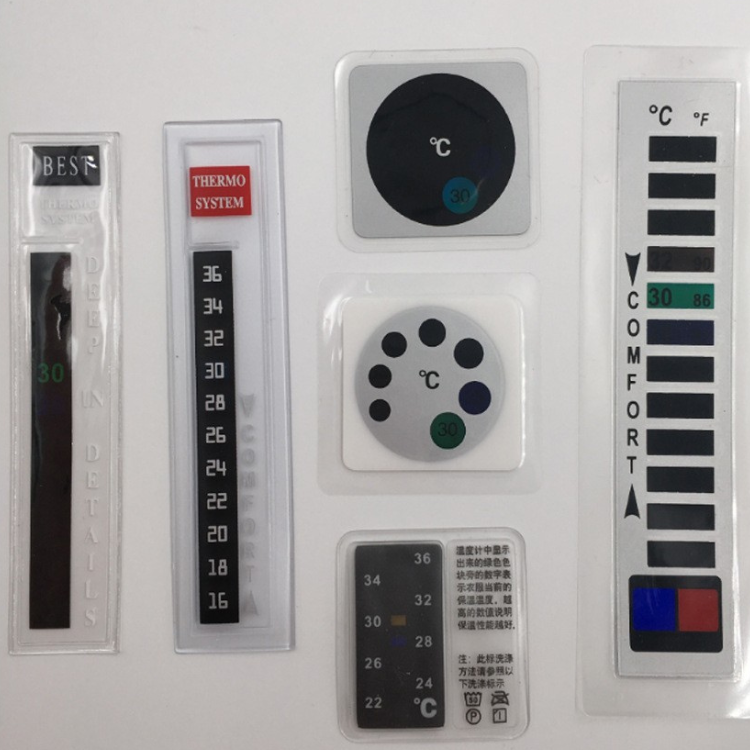
A standard temperature strip may be sufficient for general use. But for branded products, specialized equipment, or controlled applications, customization can make the indicator more useful and easier for end users to understand.
At Qingdao Focus On Color Industry & Trade Co., Ltd., we support OEM, ODM, and customized thermochromic solutions for global customers. Our team can help develop liquid crystal temperature strips based on your product's intended use, surface material, temperature range, visual requirements, and packaging needs.
Customization options may include:
- Custom temperature ranges and segment intervals
- Celsius, Fahrenheit, or dual-unit scales
- Adhesive or non-adhesive formats
- Different strip sizes, shapes, and label layouts
- Private-label branding and logo printing
- Instruction cards, retail packaging, and multilingual artwork
- Integration with thermochromic inks, coatings, pigments, and related color-changing products
A well-designed strip does more than show a temperature. It can improve product usability, reduce user uncertainty, support brand differentiation, and create a more interactive customer experience.
Need a custom liquid crystal thermometer strip or color-changing temperature indicator? Contact Qingdao Focus On Color Industry & Trade Co., Ltd. to discuss your target temperature range, product surface, branding requirements, and expected order volume. Our team will help you identify a practical solution for your market.
Read the segment that turns green. On most liquid crystal thermometer strips, green represents the closest indicated temperature.
Check the blue and tan or brown segments. If a lower value is blue and the next higher value is tan, the actual temperature is usually between those two values. If no segments activate, the temperature may be outside the strip's range.
Wait at least 30 seconds, then read the strip after the colors stabilize. Allow longer when the surface or surrounding environment is changing quickly.
They can provide useful temperature indication when selected and used correctly. Accuracy depends on the strip design, calibration, contact surface, environmental conditions, and reading method. For critical measurements, verify with a calibrated thermometer suitable for the application.
It measures the outer surface of the bottle or container. This may closely reflect liquid temperature after the system has stabilized, but it is not always identical to the temperature inside the liquid.
Many liquid crystal strips are reversible, meaning their color response changes back as temperature changes. Reusability depends on the product construction, adhesive system, handling conditions, and supplier instructions.
The temperature may be below or above the active range, depending on the strip design. Check the product's color guide and confirm whether the measured surface is within the specified range.
1. [SpotSee — Liquid Crystal Thermometers]
2. [Temperature Indicators — Thermochromic Liquid Crystal Temperature Strips]
3. [Digi-Temp — Reversible Thermochromic Liquid Crystal Thermometers]
4. [Nationwide Children's Hospital — Temperature: Digital and Glass Thermometers]
5. [Globe Scientific — Liquid Crystal Thermometer Strips]
6. [U.S. Food and Drug Administration — Non-Contact Infrared Thermometers]


